Note
Go to the end to download the full example code.
Element types#
FRD element records use a numeric type code. This reader maps 14 codes to VTK cell types, including the experimental pyramid types.
Each mesh below was solved by CalculiX from a one-element deck in
tests/fixtures/generated/src.
from pathlib import Path

import pyvista as pv

import pyvista_frd
Print the supported FRD codes.
 1  HE8
 2  PE6
 3  TE4
 4  HE20
 5  PE15
 6  TE10
 7  TR3
 8  TR6
 9  QU4
10  QU8
11  BE2
12  BE3
15  PY5
16  PY13
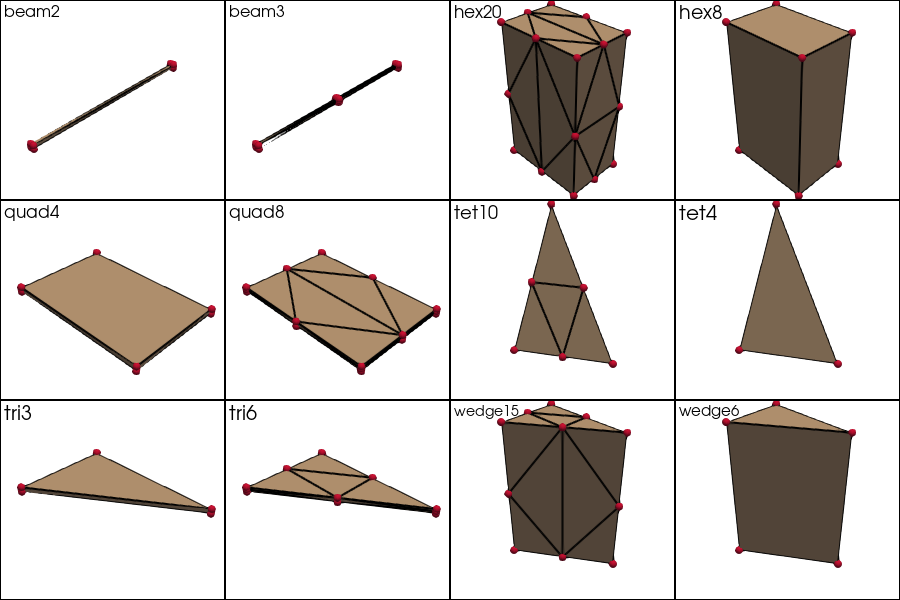
Plot one CalculiX-generated fixture for each available type.
CalculiX 2.22 rejects C3D5 and C3D13, so PY5 and PY13 have no solver-written fixture. Their test fixtures are handwritten.
root = Path('../../tests/fixtures/generated').resolve()
files = sorted(root.glob('*.frd'))

columns = 4
rows = -(-len(files) // columns)
pl = pv.Plotter(shape=(rows, columns), window_size=(900, 200 * rows))
for index, path in enumerate(files):
    mesh = pyvista_frd.read(path)
    pl.subplot(index // columns, index % columns)
    pl.add_text(path.stem, font_size=8)
    pl.add_mesh(mesh, show_edges=True, color='#c4a484', line_width=2)
    pl.add_points(mesh.points, color='crimson', point_size=8, render_points_as_spheres=True)
pl.show()
An unsupported element or invalid node count produces
pyvista.InvalidMeshWarning with the source line number. Other valid
elements remain available.
VTK changed linear-wedge node ordering in version 9.7. The Python layer selects the order from the installed VTK version. C and C++ callers select it explicitly.
print('VTK', pv.vtk_version_info)
mesh = pyvista_frd.read(root / 'wedge6.frd')
print('wedge6 cell type:', mesh.celltypes, '->', pv.CellType(mesh.celltypes[0]).name)
VTK (9, 7, 1)
wedge6 cell type: [13] -> WEDGE
Total running time of the script: (0 minutes 0.808 seconds)